
Upscale Images and Videos in Seconds with SeedVR2
Drop a blurry screenshot or a pixelated clip and let SeedVR2 rebuild the detail — right in the browser, no signup, no file upload, no waiting for a queue.
What You Can Do with SeedVR2 Right Inside the Browser
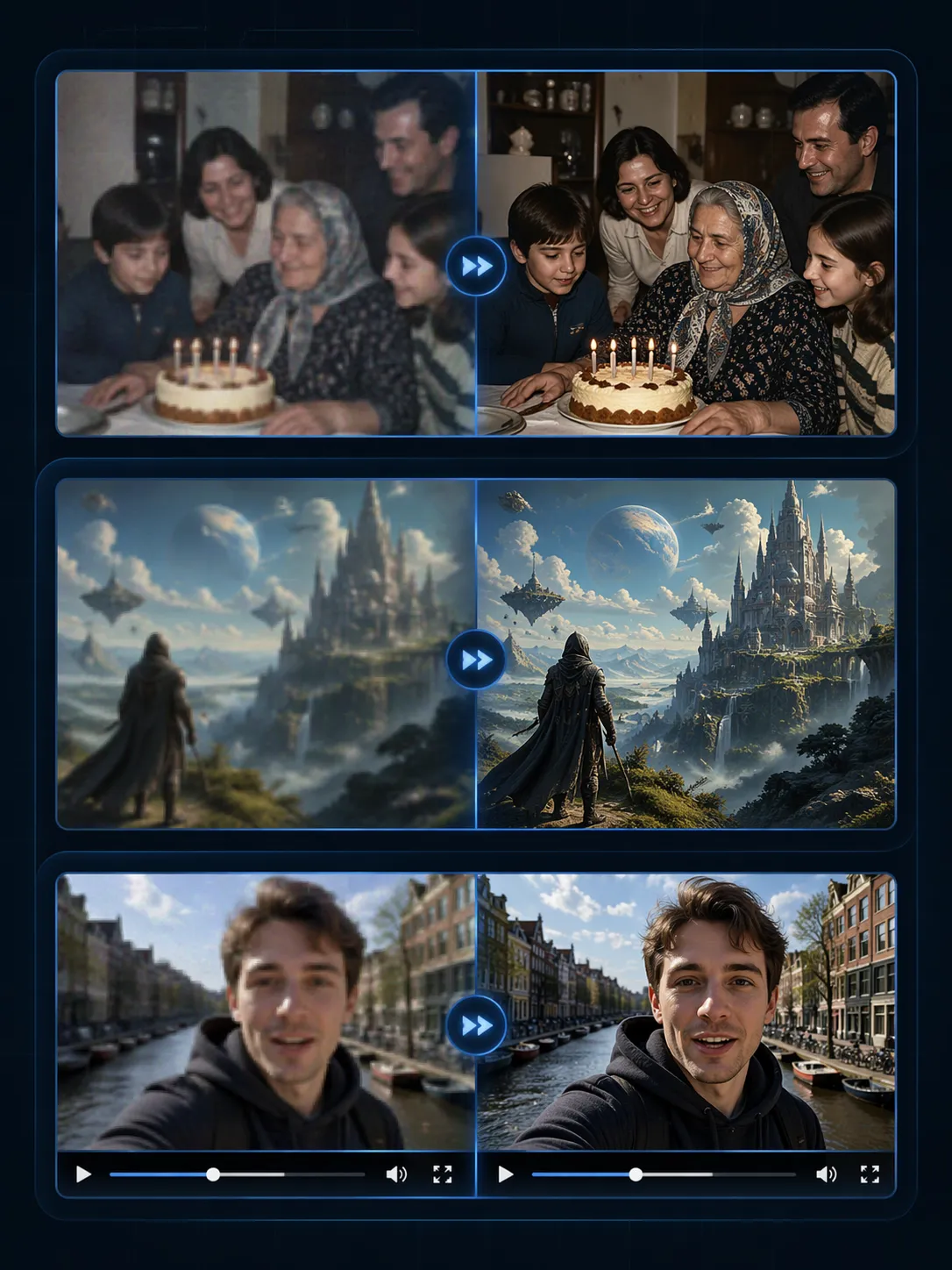
Three everyday moments where SeedVR2 earns its keep — pull an old family photo out of the archive, sharpen an AI render for print, or push a low-res clip up to a watchable edit — plus one rule that sits behind all of them.
- Bring Old Family Photos Back to LifeDrop that 2008 birthday shot taken on a tiny digital camera and SeedVR2 doubles the resolution so faces stop looking like a smudge — you can read the pattern on Grandma's scarf again. Works on any low-res JPG: scanned prints, old phone screenshots, WhatsApp-compressed sends.
- Take AI Renders from 1024px to Poster-ReadyMidjourney and Stable Diffusion default to 1024-ish squares — fine for Discord, too small for a wall print or a 4K thumbnail. Drop the render, pick Best Quality, and get a 2048×2048 version back with clean lines, textured surfaces, and none of the muddy artifacts a generic upscaler leaves behind.
- Push Low-Res Video Up to a Watchable 1440pOld vlog footage, phone clips from five years back, a 30-second 720p game capture — drag it in and each frame gets rebuilt at 2x. The audio track passes through untouched, so lip-sync stays tight and the output drops straight into your next edit as a clean MP4.
- Your Files Never Touch a ServerZero upload. The model downloads once into your browser cache, then SeedVR2 runs all the math on your own device — photos, raw footage, whatever sensitive stuff you drop in. The sharpened copy writes straight back to your local downloads folder. There is no backend to leak from, because there is no backend.
Why Creators Keep Coming Back to SeedVR2
Most AI upscalers ask for something — a subscription, a beefy desktop, or permission to store your uploads. SeedVR2 asks for none of that and still holds up on quality.

How SeedVR2 Enhances a File in Three Quick Moves
The whole flow takes about one minute of active clicking — no tutorial required:
Drag the File In
Drop a PNG, JPG, MP4, WebM, or MOV anywhere on the upload zone. SeedVR2 detects whether it's an image or a video automatically and routes it to the matching pipeline.
Choose How Aggressive
Three presets cover almost every need — Fast for a quick social touch-up, Balanced for everyday upscaling, Best Quality when the result is going to print or a 4K timeline. Preview refreshes while you switch between them.
Save the Sharper Copy
Hit Download. Images land as PNG, videos keep the original audio and ship as MP4 (WebM on Safari for codec reasons). You never get asked for an email before keeping your own file.
What Makes SeedVR2 Feel Fast and Clean
A quick tour of the pieces that let SeedVR2 turn a 30-second upload into a sharper export without cooking your laptop.
Browser-Native GPU Pipeline
SeedVR2 dispatches its upscaling kernels onto WebGPU when available and WebGL as a fallback, which means the graphics chip — integrated or discrete — handles the heavy math. Expect several times the throughput of a CPU-only tool running the same kind of model.
Honest 2x, Not Marketing 2x
Instead of bicubic or nearest-neighbor tricks, SeedVR2 reconstructs content at pixel level. A 1080×720 frame turns into a real 2160×1440 frame with genuinely new detail — logos become legible, foliage regains texture, compression artifacts fade away.
Three Quality Tiers on One Model
The Fast / Balanced / Best Quality switch controls how many refinement passes SeedVR2 runs across each frame. Fast finishes a minute of footage in a couple of minutes, Best Quality doubles the wait but pulls out the cleanest possible output.
Lossless Handoff to Export
Upscaled frames are written straight into the output container with no extra compression pass. What the preview shows is byte-for-byte what lands in your downloads folder, so the sharpness you picked is the sharpness you keep.
Audio Travels With the Video
The video pass only rebuilds the visual frames. The original audio stream — dialogue, score, ambient noise — is carried through to the output at source bitrate, so lip-sync stays tight and music does not get reprocessed.
Frame-by-Frame Memory Discipline
Rather than loading an entire clip into RAM, each frame is streamed through the model, written to the encoder, and dropped before the next one is read. Long videos stay stable — tabs do not balloon and laptops do not thrash.
SeedVR2 in a Few Quick Numbers
The footprint is deliberately small — here is what that looks like in practice.
2x Output Resolution Gain
Output Resolution Gain
0 Apps to Download
Apps to Download
100% Files Stay Local
Files Stay Local
SeedVR2 — Questions People Ask Us Most
Short answers about how the tool works, what it costs, and the limits worth knowing before you commit to a full export.
Take SeedVR2 for a Spin — It's Still Free
Pull a blurry photo or a noisy video off your desktop and let the tool polish it up. No account, no queue, no catch — just a sharper file back in a minute.